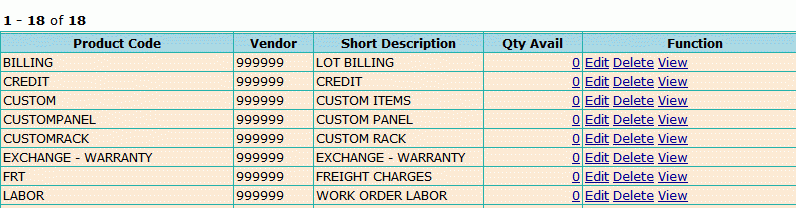
To search the Group Inventory go to the Inventory
Header -> click on Group Catalog Search.
Next, at the Search Group Inventory
screen enter data for search criteria.
You
will notice that there are (2) radio buttons, Inventory Catalog List
or Multi Edit, make sure that Inventory
Catalog List is selected.
There
are several ways to search for an Item in the Group
Inventory file.
Product Code: Enter in the full (10-digit) or partial Product Code
Vendor #: click on Vendor Link to search for Vendor Number
Stock Class: Stock, MFG Stock, Special and Non-Stock
Family Group: select from the drop down menu - will narrow the search
Description: short description of item
MFG prefix
Cross Ref Code or the Generic Code
Cost Group
Price Group
Click on Search.
The Multi
Edit is to use when you need to Edit
an item. Choose Multi Edit
and then enter in Search criteria for Item and select which function
to Edit from the table at the bottom of the search menu (above).
At the results display
you will have the following options:
Click on the Qty Avail and see all locations on material
Edit: Allows you to make changes to an Item
Delete: Selecting delete will remove the item from the group file
View: Display all information
for a particular item