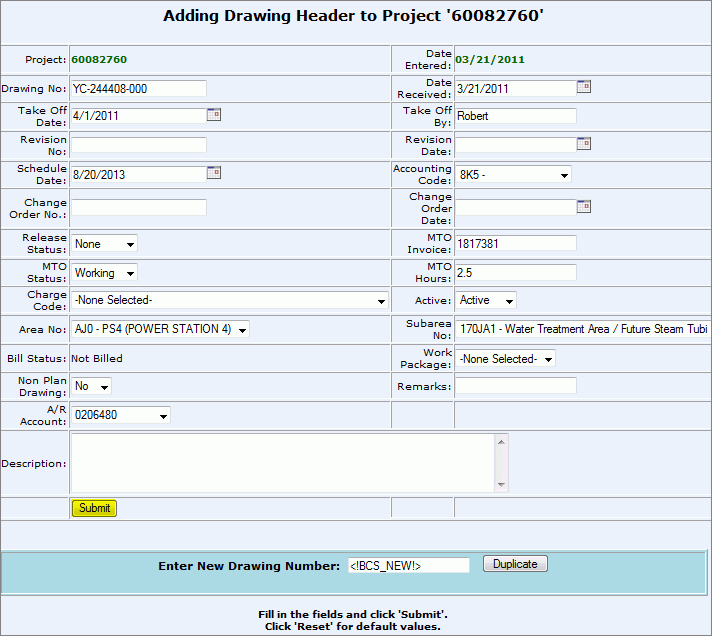
Add New Drawing
Overview: The Engineering Drawing must be electronically entered into CMMS as a new drawing. This electronic rendition was created during the material takeoff process. The drawing header contains general information for each drawing. Some of the fields entered can be used as selection criteria during the material release process as well as to generate job status reports. The Drawing Header holds the organization in CMMS for all details and items on a drawing.
Process:
Add New Drawing Header
1. From the CMMS Menu > Drawings > New Drawing.
2. Enter in all known data:
Drawing Number: Number associated with the IFC Drawing or the IFA Drawing.
Date Received: Date the Drawing was received.
Take Off Date: The date that the estimate was completed on the drawing.
Take off By: Who performed the estimate take off. (ex: Wholesale Electric employee name)
Revision No: The current revision number (numerically labeled) for the drawing.
Revision Date: Date when there is a revision made to the drawing.
Schedule Date: The date material is required on the site based on the construction schedule.
Accounting Code: Client assigned number used for the tracking of cost and the allocation of that cost to the proper general ledger account.
Change Order No: Field or Engineering change order number.
Change Order Date: Field or Engineering change order date created.
Release Status: the release status of all of the material loaded in the drawing header: None, Partial, Complete.
MTO Invoice: The invoice number for the MTO billing.
MTO Status: Indicates the status of the Material Take Off: Complete, Pending, No MTO, or Working.
MTO Hours: Chargeable hours to complete the MTO.
Charge Code: Identifies an account to which a product is to be charged against.
Active: Active or Inactive. Drawing header must be Active to release material against it. An Inactive selection prohibits material releases.
Area No: Client supplied data used to divide major construction areas.
Subarea No: Client supplied data used to sub-divide major construction areas.
Bill Status: Will appear as Not Billed while the Header is in a Working Status.
Work Package: System or work package number.
Non Plan Drawing: Section views, details, reference drawings where no material is loaded. All MTO quantities are loaded on the plan drawing.
Remarks: Enter any additional remarks.
A/R Account: Identifies the account the material will be billed to.
Description: Description of Drawing.
3. Click Submit to generate new Drawing Header
4. You must change the "MTO Status" field from Working to either Complete, No MTO, or Pending once you have submitted the Drawing Header.
*You cannot release material from a drawing if the "MTO Status" is in the Working stage.
Next Step:
Search For the New Drawing Header and then Add Items or Add Details to the Drawing.